

Backup Capacity Calculator
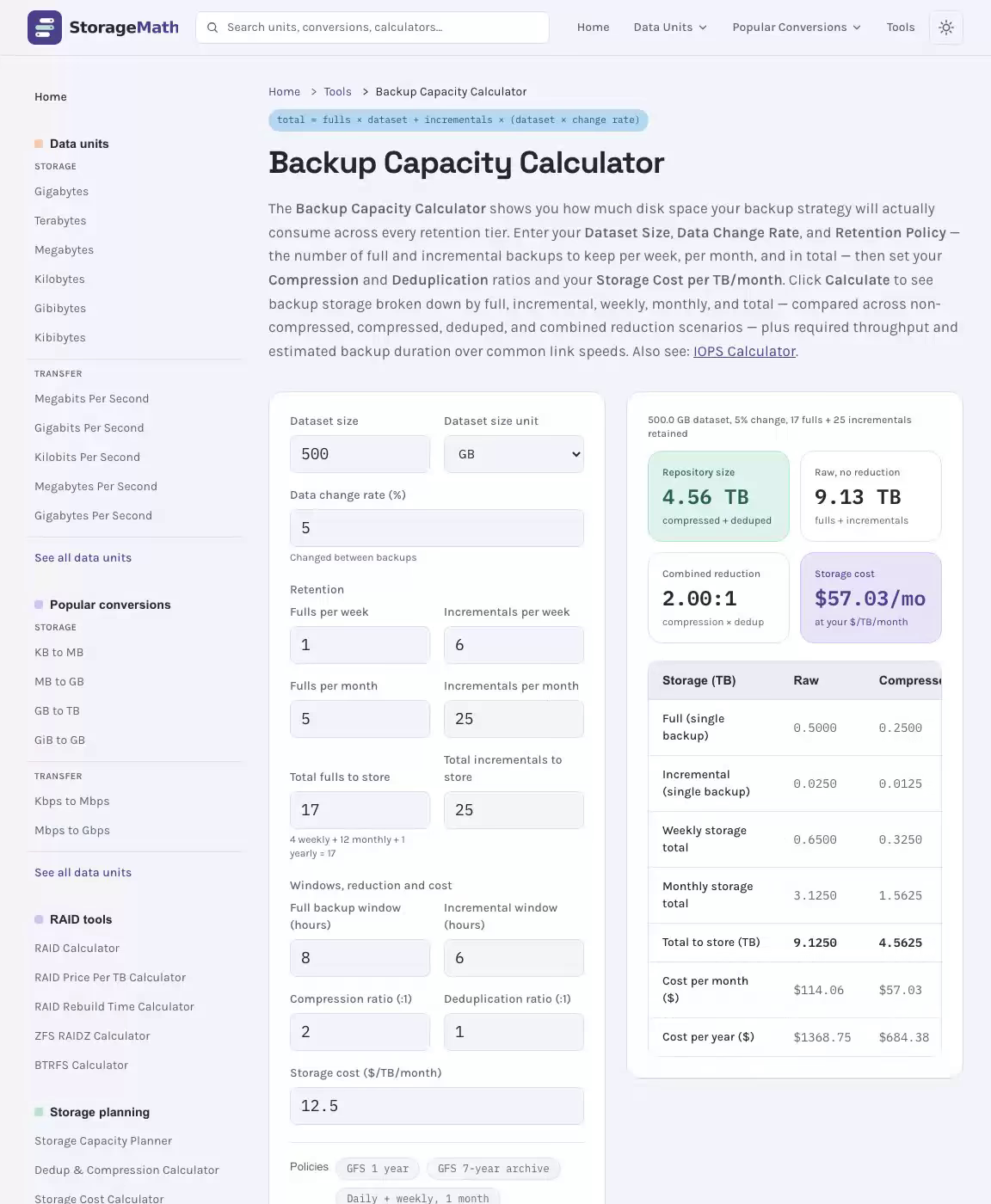
The Backup Capacity Calculator shows you how much disk space your backup strategy will actually consume across every retention tier. Enter your Dataset Size, Data Change Rate, and Retention Policy — the number of full and incremental backups to keep per week, per month, and in total — then set your Compression and Deduplication ratios and your Storage Cost per TB/month. Click Calculate to see backup storage broken down by full, incremental, weekly, monthly, and total — compared across non-compressed, compressed, deduped, and combined reduction scenarios — plus required throughput and estimated backup duration over common link speeds. Also see: IOPS Calculator.
Total Backup Storage Required Across Your Retention Window
500.0 GB dataset, 5% change, 17 fulls + 25 incrementals retained
Repository size
compressed + deduped
Raw, no reduction
fulls + incrementals
Combined reduction
compression × dedup
Storage cost
at your $/TB/month
Total Raw and Deduplicated Backup Storage Size
| Storage (TB) | Raw | Compressed | Deduped | Both |
|---|---|---|---|---|
| Full (single backup) | 0.5000 | 0.2500 | 0.5000 | 0.2500 |
| Incremental (single backup) | 0.0250 | 0.0125 | 0.0250 | 0.0125 |
| Weekly storage total | 0.6500 | 0.3250 | 0.6500 | 0.3250 |
| Monthly storage total | 3.1250 | 1.5625 | 3.1250 | 1.5625 |
| Total to store (TB) | 9.1250 | 4.5625 | 9.1250 | 4.5625 |
| Cost per month ($) | $114.06 | $57.03 | $114.06 | $57.03 |
| Cost per year ($) | $1368.75 | $684.38 | $1368.75 | $684.38 |
Check the backup window is achievable
Throughput needed to finish inside the window, before compression, and how long each job takes at common link speeds.
Required Throughput to Meet Backup Window (non-compressed)
| Backup | GB/hour | Gbit/s | Mbit/s |
|---|---|---|---|
| Full backup | 62.50 | 0.1389 | 138.8889 |
| Incremental backup | 4.17 | 0.0093 | 9.2593 |
Estimated Backup Duration (non-compressed, d:hh:mm:ss)
| Link speed | Full (d:hh:mm:ss) | Incremental |
|---|---|---|
| 100 Mbit/s | 0:11:06:40 | 0:00:33:20 |
| 1 Gbit/s | 0:01:06:40 | 0:00:03:20 |
| 10 Gbit/s | 0:00:06:40 | 0:00:00:20 |
| 25 Gbit/s | 0:00:02:40 | 0:00:00:08 |
Note: 1 TB = 1,000 GB = 1,000,000,000,000 bytes (decimal SI)
Grandfather-Father-Son Backup Retention Schedule Reference
| Retention Strategy | Full/Week | Full/Month | Total Fulls | Incr/Week | Incr/Month | Total Incr |
|---|---|---|---|---|---|---|
| GFS — 1 Year | 1 | 5 | 17 | 6 | 25 | 25 |
| GFS — 7 Year Archive | 1 | 5 | 89 | 6 | 25 | 25 |
| Daily + Weekly (1 month) | 1 | 1 | 4 | 6 | 25 | 25 |
| Incremental Forever (CBT) | 0 | 0 | 14 | 0 | 0 | 30 |
GFS 1-Year: 4 weekly + 12 monthly + 1 yearly = 17 full backups. Incremental Forever (CBT): 1 initial full + 12 monthly synthetic + 1 yearly synthetic = 14 fulls, 30 daily incrementals.
Change Rate, Dedup Ratio and Retention: Sizing Your Backup Target
When you're planning a backup strategy, knowing exactly how much storage you'll need before you commit to infrastructure or cloud spend is the difference between a resilient data protection plan and an expensive miscalculation. This backup capacity calculator gives you a precise estimate of your total backup storage footprint — factoring in your retention policy, backup types, compression, and deduplication — so you can make confident decisions about hardware, cloud tiers, or managed services without guessing.
See the Backup Capacity Calculator in Action
How the Backup Capacity Calculator Works for Your Storage Planning
The backup capacity calculator models your entire backup environment by combining several interdependent variables: how much data you have, how fast it changes, how often you back it up, how long you keep each copy, and how efficiently your backup software compresses and deduplicates that data. The output gives you a realistic picture of raw and reduced storage consumption across daily, weekly, monthly, and yearly retention tiers — including an optional storage cost per TB/month estimate to translate bytes into budget line items. Related: SSD Endurance Calculator.
Under the hood, the calculator simulates a Grandfather-Father-Son (GFS) retention model. Daily incrementals roll into weekly fulls, weekly fulls roll into monthly fulls, and monthly fulls roll into yearly fulls. This layered approach mirrors how enterprise backup tools like VMware-integrated solutions and Veeam structure their schedules, so the numbers you see here map directly to what your backup software will actually consume on disk.
Key Inputs: What You Need to Get Started
Before you run a calculate operation, gather the values below. Every field has a material impact on the final result, so understanding what each one represents helps you avoid under- or over-provisioning your backup repository.
| Parameter | Description | Accepted Range | Example Value |
|---|---|---|---|
| Data set size: | Total size of the source data to be protected (production data) | Any positive value in TB or GB | 5 TB |
| Data change rate (%): | Percentage of the dataset that changes each day; drives incremental backup size | 1% – 50% | 10% |
| Number of full backups to store per week: | How many weekly full backup copies are retained at any given time | 0 – 7 | 1 |
| Number of full backups to store per month: | Monthly full copies retained (includes weekly + dedicated monthly fulls) | 0 – 31 | 5 |
| Total number of full backups to store: | Aggregate of weekly + monthly + yearly full copies; drives total full backup storage | 1 – 365 | 17 |
| Target full backup window (hr): | Maximum hours available to complete a full backup; used to calculate required throughput | 1 – 24 hr | 8 hr |
| Number of incremental backups to store per week: | Daily incremental copies kept within a single week | 0 – 6 | 6 |
| Number of incremental backups to store per month: | Total daily incremental copies retained across a month (excluding days covered by fulls) | 0 – 31 | 25 |
| Total number of incremental backups to store: | Grand total of all incremental copies across the full retention window | 1 – 365 | 25 |
| Target incremental backup windows (hr): | Maximum hours available to complete each incremental backup job | 0.5 – 12 hr | 2 hr |
| Expected compression ratio: | Ratio at which backup software compresses data (e.g., 2:1 halves raw size) | 1:1 – 10:1 | 2:1 |
| Expected de-duplication ratio: | Ratio at which the repository removes duplicate data blocks across backup sets | 1:1 – 30:1 | 3:1 |
| Storage cost per TB/month: | Optional cloud or on-premises cost rate; converts capacity into monthly and annual spend | Any positive dollar value | $25/TB |
Understanding Backup Window and Retention Policy
Your target backup window — split into target full backup window (hr) and target incremental backup windows (hr) — defines the maximum time your backup jobs have to complete before business operations resume. A tighter window demands higher network throughput and faster storage. The calculator uses your data set size and window duration to surface the required GB/hour and Gbit/sec throughput, so you can validate whether your existing network infrastructure can actually meet your SLA before you discover the gap at 3 a.m.
The retention policy is arguably the single biggest lever on total storage consumption. Retaining weekly fulls for one month is radically different from retaining them for one year. The calculator separates retention into weekly, monthly, and yearly tiers, then aggregates them into the total number of full backups to store and the total number of incremental backups to store — the two headline figures that determine your repository size.
Repository type also matters. A regular repository stores backup files in a standard read-write format, which is flexible but vulnerable to ransomware that can reach and encrypt backup data. An immutable repository enforces write-once-read-many (WORM) semantics — once a backup is written, it cannot be altered or deleted until the retention period expires. Immutable storage typically costs slightly more per TB but provides a critical air-gap against malicious deletion. The storage reduction factor — your combined expected compression ratio and expected de-duplication ratio — applies equally to both repository types and can dramatically shrink the raw capacity figure before you commit to any purchase.
Example Backup Scenarios
The three scenarios below illustrate how the calculator's inputs interact at different scales. Each uses a weekly full plus daily incremental strategy unless stated otherwise, and each shows how the storage reduction factor changes the real-world capacity requirement versus the raw (non-compressed, non-deduplicated) baseline.
Scenario 1 — Small Business (1–5 TB)
- Data set size: 5 TB production data
- Data change rate: 10% daily (0.5 TB of changed data per day)
- Backup types: Weekly full + daily incremental (6 days/week)
- Retention policy: 4-week retention — number of full backups to store per week: 1, number of full backups to store per month: 4, total number of full backups to store: 4; number of incremental backups to store per week: 6, number of incremental backups to store per month: 25, total number of incremental backups to store: 25
- Expected compression ratio: 2:1 | Expected de-duplication ratio: 2:1
- Repository type: Regular repository
Raw storage required: (4 fulls × 5 TB) + (25 incrementals × 0.5 TB) = 20 TB + 12.5 TB = 32.5 TB raw. After applying a 2:1 compression ratio the figure drops to 16.25 TB, and after a further 2:1 deduplication ratio the effective repository size falls to approximately 8.1 TB. At a storage cost per TB/month of $25, this translates to roughly $203/month — a number a small IT team can plan around with confidence.
Scenario 2 — Mid-Market Organization (20 TB)
- Data set size: 20 TB
- Data change rate: 5% daily (1 TB of changed data per day)
- Backup types: Weekly full + daily incremental
- Retention policy: 90-day retention — total number of full backups to store: 17 (4 weekly + 12 monthly + 1 yearly representative set); total number of incremental backups to store: 77 (90 days minus 13 full-backup days)
- Expected compression ratio: 2:1 | Expected de-duplication ratio: 3:1
- Repository type: Immutable repository
Raw storage: (17 × 20 TB) + (77 × 1 TB) = 340 TB + 77 TB = 417 TB raw. After 2:1 compression: 208.5 TB. After 3:1 deduplication: approximately 69.5 TB effective. This scenario highlights how a longer retention policy — even with a lower data change rate — drives the total number of incremental backups to store up significantly, and why the expected de-duplication ratio is so impactful at this scale. The immutable repository adds ransomware resilience, and the effective 6:1 combined reduction makes that resilience economically viable.
Scenario 3 — Enterprise / VMware Environment (100 TB)
- Data set size: 100 TB (VMware virtual machine workloads with Change Block Tracking enabled)
- Data change rate: 3% daily (3 TB of changed data per day)
- Backup types: Daily synthetic full (incremental-forever / CBT-based) — a single initial full backup, then daily incrementals synthesized into monthly and yearly fulls
- Retention policy: 1-year retention — total number of full backups to store: 14 (1 initial + 12 monthly + 1 yearly); total number of incremental backups to store: 352 (365 days minus 13 full-backup days); per-week and per-month counts set to 0 since no scheduled weekly fulls run
- Expected compression ratio: 3:1 | Expected de-duplication ratio: 10:1
- Repository type: Immutable repository (air-gapped S3 object lock)
Raw storage: (14 × 100 TB) + (352 × 3 TB) = 1,400 TB + 1,056 TB = 2,456 TB raw. After 3:1 compression: 818.7 TB. After 10:1 deduplication (realistic for a VMware environment with many similar OS images): approximately 81.9 TB effective. This demonstrates in stark terms why the expected de-duplication ratio and expected compression ratio are the most powerful dials in this tool for large, homogeneous datasets. A 30:1 combined reduction turns a 2.4 PB raw problem into an 81 TB solution — an outcome you simply cannot plan for without running the numbers first.
The results table below summarizes all three scenarios side-by-side for quick comparison.
| Metric | Small Business (5 TB) | Mid-Market (20 TB) | Enterprise VMware (100 TB) |
|---|---|---|---|
| Raw backup storage required | 32.5 TB | 417 TB | 2,456 TB |
| After compression only | 16.25 TB | 208.5 TB | 818.7 TB |
| After compression + deduplication | 8.1 TB | 69.5 TB | 81.9 TB |
| Total number of full backups to store | 4 | 17 | 14 |
| Total number of incremental backups to store | 25 | 77 | 352 |
| Repository type | Regular repository | Immutable repository | Immutable repository |
| Estimated monthly cost (@ $25/TB) | ~$203 | ~$1,738 | ~$2,048 |
Whether you're sizing a first backup server for a five-person office or renegotiating a cloud storage contract for a multi-site enterprise, running your numbers through the backup capacity calculator before you buy means you're negotiating from a position of knowledge rather than assumption. Adjust your retention policy, experiment with different expected de-duplication ratio values, and compare regular repository versus immutable repository costs — the tool recalculates instantly so you can find the configuration that balances protection, compliance, and budget without compromise.
RPO, RTO, Dedup Ratio and Backup Window Defined
GFS (Grandfather-Father-Son): A hierarchical backup retention scheme. Daily (son) backups roll into weekly (father) fulls, which roll into monthly (grandfather) archives retained for extended periods.
Incremental Backup: Captures only data changed since the last backup — either full or incremental. Requires chaining previous backups to restore. Smaller and faster than full backups.
Incremental Forever (CBT): One initial full backup followed entirely by incrementals. Synthetic fulls are assembled from existing backup data without re-reading the source. Common in VMware vSphere and Veeam environments using Change Block Tracking.
Data Change Rate: The percentage of total data modified between backup cycles. Typical enterprise workloads: file servers 2–5%, databases 5–15%, virtual machines 3–8% per day.
Backup Window: The scheduled time slot for backups to complete without impacting production. Required throughput = dataset size ÷ backup window hours.
Deduplication vs Compression: Deduplication removes duplicate data blocks across the entire backup repository (cross-backup). Compression reduces each backup stream individually using lossless algorithms. They stack multiplicatively.
Backup Capacity Calculator: Frequently Asked Questions
3 questions Quick answers about the Backup Capacity Calculator and how its results are calculated.
-
How do I calculate backup storage requirements?
Multiply the number of full backups to retain by the dataset size, then add the number of incremental backups multiplied by (dataset size × change rate). Apply compression and deduplication ratios to get the actual on-disk size.
-
What is a GFS backup retention policy?
GFS (Grandfather-Father-Son) is a hierarchical retention scheme where daily backups roll into weekly, weekly into monthly, and monthly into annual archives, each retained for progressively longer periods.
-
What is a typical data change rate for backup planning?
Most enterprise workloads see a 1–10% daily data change rate. File servers typically change 2–5%, databases 5–15%, and virtual machine environments 3–8% per day.