

BTRFS Space Calculator
Enter your device sizes, a data profile, and a metadata profile to see real usable capacity — correctly handling differently-sized devices, which most RAID calculators get wrong for BTRFS. Covers all nine BTRFS profiles: Single, DUP, RAID0, RAID1, RAID1C3, RAID1C4, RAID10, RAID5, and RAID6. Also see: Data Transfer Time Calculator.
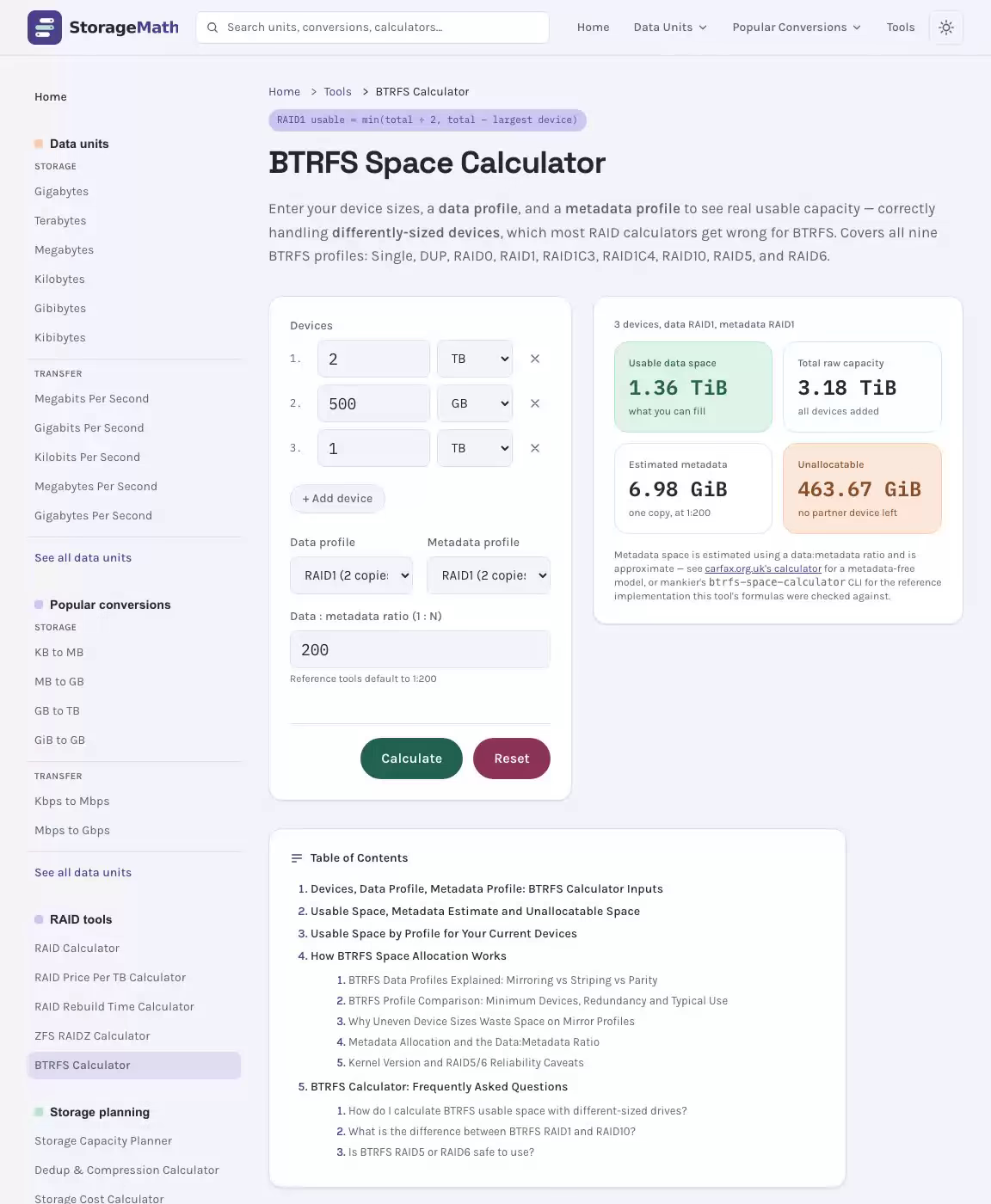
3 devices, data RAID1, metadata RAID1
Results
Usable data space
what you can fill
Total raw capacity
all devices added
Estimated metadata
one copy, at 1:200
Unallocatable
no partner device left
Metadata space is estimated using a data:metadata ratio and is approximate — see carfax.org.uk's calculator for a metadata-free model, or mankier's btrfs-space-calculator CLI for the reference implementation this tool's formulas were checked against.
Usable Space by Profile for Your Current Devices
| Profile | Min Devices | Usable (data profile only) |
|---|---|---|
| Single (no redundancy) | 1 | 3.17 TiB |
| DUP (2 copies, same device) | 1 | 1.58 TiB |
| RAID0 (striped, no redundancy) | 2 | 1.36 TiB |
| RAID1 (2 copies) | 2 | 1.36 TiB |
| RAID1C3 (3 copies) | 3 | 464.66 GiB |
| RAID1C4 (4 copies) | 4 | 0 B |
| RAID10 (striped + mirrored) | 4 | 0 B |
| RAID5 (single parity) | 2 | 929.33 GiB |
| RAID6 (double parity) | 3 | 464.66 GiB |
How BTRFS Space Allocation Works
Unlike traditional hardware or software RAID, BTRFS doesn't require every device in a pool to be the same size — it allocates space in fixed-size chunks and spreads those chunks across whichever devices have room. That flexibility is exactly what makes BTRFS capacity planning hard to eyeball: two devices of different sizes in a mirrored profile don't simply add up, because the larger device eventually runs out of a same-size partner to mirror against. This BTRFS space calculator models that chunk allocation directly, so you get a real usable-capacity number instead of a rough guess.
See the BTRFS Calculator in Action
BTRFS Data Profiles Explained: Mirroring vs Striping vs Parity
Every BTRFS filesystem stores data (and separately, metadata) using a profile — a policy that controls how many copies of each chunk are kept and how they're spread across devices. Profiles fall into three families:
- Mirror profiles (single, DUP, RAID1, RAID1C3, RAID1C4) keep 1 to 4 full copies of every chunk. RAID1-family profiles require each copy to live on a different device — that's the constraint that makes uneven device sizes matter. DUP is the odd one out: its two copies can both live on the same device, so it doesn't hit that bottleneck.
- Striped profiles (RAID0) spread data across all devices with zero redundancy — losing any one device loses the whole filesystem. Capacity is limited by the smallest device, since a full-width chunk needs equal-sized room on every device.
- Striped + parity/mirror profiles (RAID5, RAID6, RAID10) combine striping with redundancy: RAID5 reserves one device's worth of parity per stripe, RAID6 reserves two, and RAID10 stripes across mirrored pairs.
BTRFS Profile Comparison: Minimum Devices, Redundancy and Typical Use
The table below summarizes all nine BTRFS profiles this calculator supports:
| Profile | Min Devices | Redundancy | Typical Use |
|---|---|---|---|
| Single | 1 | None | Scratch data, cache, or mixing with other profiles temporarily |
| DUP | 1 | 2 copies, same device allowed | Single-device filesystems (default metadata profile on older single-disk setups) |
| RAID0 | 2 | None | Maximum capacity/throughput, no fault tolerance |
| RAID1 | 2 | 2 copies, different devices | General-purpose redundancy — most common multi-device profile |
| RAID1C3 | 3 | 3 copies, different devices | Higher fault tolerance for critical data (needs kernel 5.5+) |
| RAID1C4 | 4 | 4 copies, different devices | Maximum mirror redundancy (needs kernel 5.5+) |
| RAID10 | 4 (even) | Mirrored pairs, striped | Performance + redundancy balance |
| RAID5 | 2 | Single parity | Capacity-efficient redundancy — see the reliability caveat below |
| RAID6 | 3 | Double parity | Higher fault tolerance than RAID5 — see the reliability caveat below |
Why Uneven Device Sizes Waste Space on Mirror Profiles
For RAID1-family profiles, every chunk needs its copies on separate devices. If one device is much larger than the rest combined, it eventually runs out of differently-sized partners to mirror new chunks against — the excess capacity on that device becomes unallocatable. The exact rule this calculator uses: for a profile with k copies, usable space equals whichever is smaller — total capacity divided by k, or total capacity minus the sum of the (k-1) largest devices. This formula was checked against a worked example published in the btrfs-space-calculator CLI documentation (2TB + 500GB + 1TB devices in RAID1), reproducing its published unallocatable-space figure within rounding. Related: RAID Price Per TB Calculator.
Striped profiles (RAID0, RAID5, RAID6, RAID10) hit a related but simpler limit: a full-width stripe needs equal room on every participating device, so capacity is capped by the smallest device in the set — any extra space on larger devices sits unused unless you mix in a different profile for it.
Metadata Allocation and the Data:Metadata Ratio
BTRFS allocates metadata (filesystem structure — extents, checksums, directory trees) separately from file data, often using a different profile for extra safety. This calculator estimates metadata's raw space consumption using the same ratio approach as the reference btrfs-space-calculator CLI tool: by default, metadata is sized at roughly 1:200 of usable data space (adjustable in the calculator above). That estimate is then converted to raw bytes using the metadata profile's own redundancy factor and subtracted from the pool before the final data-capacity figure is computed. Real metadata usage varies with file count, fragmentation, and subvolume/snapshot activity, so treat this as an estimate — the same caveat the reference tools themselves carry.
Kernel Version and RAID5/6 Reliability Caveats
Two things worth knowing before committing to a profile:
- RAID1C3 and RAID1C4 require Linux kernel 5.5 or later — they didn't exist in earlier BTRFS implementations.
- RAID5 and RAID6 on BTRFS have long-documented reliability issues, including a write-hole problem during unclean shutdowns and historically unreliable parity scrub/rebuild behavior. Most BTRFS documentation and distribution maintainers still advise against RAID5/6 for production data as of current stable kernels — this calculator supports them for capacity planning, but treat the redundancy they provide with caution and keep backups regardless of profile.
As always, no calculator replaces monitoring btrfs filesystem usage and btrfs device usage on your live filesystem — this tool is for planning ahead of a mkfs.btrfs or btrfs balance -dconvert= / -mconvert= operation, not a substitute for checking real allocation afterward.
BTRFS Calculator: Frequently Asked Questions
3 questions Quick answers about the BTRFS Calculator and how its results are calculated.
-
How do I calculate BTRFS usable space with different-sized drives?
For RAID1-family profiles (RAID1, RAID1C3, RAID1C4), usable space equals the smaller of: total capacity divided by the number of copies, or total capacity minus the sum of the largest (copies-1) devices. That second case is what triggers when one device is oversized relative to the rest — its excess becomes unallocatable.
-
What is the difference between BTRFS RAID1 and RAID10?
RAID1 keeps 2 full copies of every chunk spread across any 2 devices. RAID10 requires an even number of devices (minimum 4): it mirrors pairs of devices, then stripes data across those mirrored pairs, giving better throughput at the same 50% capacity overhead.
-
Is BTRFS RAID5 or RAID6 safe to use?
BTRFS RAID5 and RAID6 have documented reliability issues, including a write-hole problem on unclean shutdowns. Most BTRFS maintainers and distribution documentation currently advise against using them for production data. This calculator supports them for capacity planning, but keep backups regardless of profile.