

Storage Throughput Converter
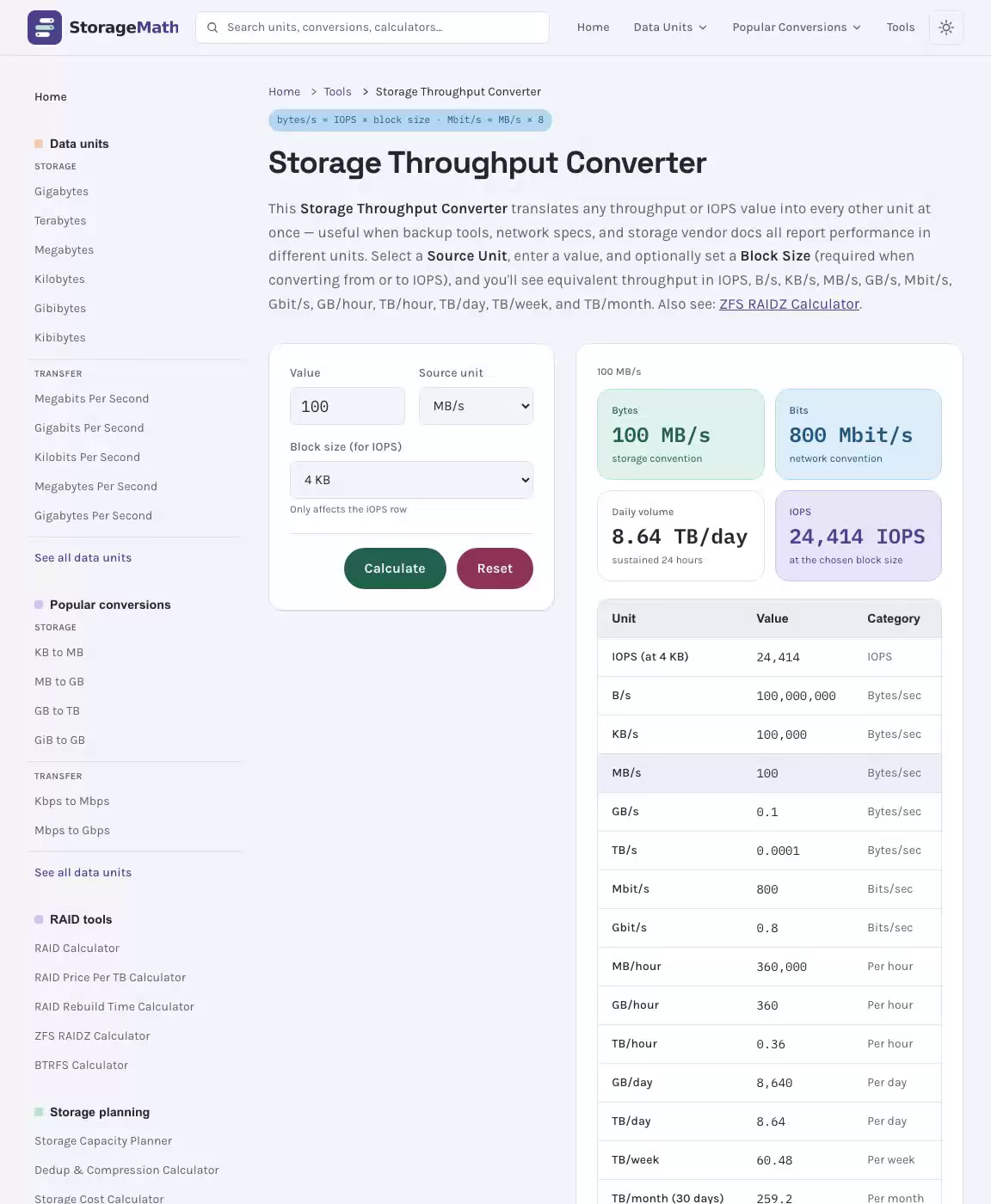
This Storage Throughput Converter translates any throughput or IOPS value into every other unit at once — useful when backup tools, network specs, and storage vendor docs all report performance in different units. Select a Source Unit, enter a value, and optionally set a Block Size (required when converting from or to IOPS), and you'll see equivalent throughput in IOPS, B/s, KB/s, MB/s, GB/s, Mbit/s, Gbit/s, GB/hour, TB/hour, TB/day, TB/week, and TB/month. Also see: Data Transfer Time Calculator.
Results
100 MB/s
Bytes
storage convention
Bits
network convention
Daily volume
sustained 24 hours
IOPS
at the chosen block size
| Unit | Value | Category |
|---|---|---|
| IOPS (at 4 KB) | 24,414 | IOPS |
| B/s | 100,000,000 | Bytes/sec |
| KB/s | 100,000 | Bytes/sec |
| MB/s | 100 | Bytes/sec |
| GB/s | 0.1 | Bytes/sec |
| TB/s | 0.0001 | Bytes/sec |
| Mbit/s | 800 | Bits/sec |
| Gbit/s | 0.8 | Bits/sec |
| MB/hour | 360,000 | Per hour |
| GB/hour | 360 | Per hour |
| TB/hour | 0.36 | Per hour |
| GB/day | 8,640 | Per day |
| TB/day | 8.64 | Per day |
| TB/week | 60.48 | Per week |
| TB/month (30 days) | 259.2 | Per month |
IOPS to MB/s at Common Block Sizes
| IOPS | 4 KB block (MB/s) | 8 KB block (MB/s) | 64 KB block (MB/s) | 256 KB block (MB/s) | 1 MB block (MB/s) |
|---|---|---|---|---|---|
| 1,000 | 3.91 | 7.81 | 62.5 | 250 | 976.6 |
| 10,000 | 39.1 | 78.1 | 625 | 2,500 | 9,766 |
| 100,000 | 390.6 | 781.3 | 6,250 | 25,000 | 97,656 |
| 500,000 | 1,953 | 3,906 | 31,250 | 125,000 | 488,281 |
| 1,000,000 | 3,906 | 7,813 | 62,500 | 250,000 | 976,563 |
Formula: MB/s = IOPS × Block Size (KB) ÷ 1024. These are decimal MB (1 MB = 1,000,000 bytes).
MB/s, GB/s, MiB/s, GiB/s and IOPS Conversion Reference
| From / To | MB/s | Mbit/s | GB/hour | TB/day |
|---|---|---|---|---|
| 1 MB/s = | 1 | 8 | 3.6 | 0.0864 |
| 1 Mbit/s = | 0.125 | 1 | 0.45 | 0.0108 |
| 1 GB/hour = | 0.2778 | 2.222 | 1 | 0.024 |
| 1 TB/day = | 11.574 | 92.593 | 41.667 | 1 |
IOPS, MB/s and MiB/s: SI vs IEC Storage Speed Units Explained
Whether you're a network engineer sizing up a fiber link, an IT administrator planning cloud archiving, or a home user trying to figure out why a file transfer is slower than expected, precise storage math is the key to making smart decisions. This storage throughput converter gives you instant conversion across every major measurement — from KB/s to Tbps — so you know exactly how much bandwidth you need and how long any transfer will really take.
See the Storage Throughput Converter in Action
How to Use This Storage Throughput Converter for Throughput Units
Getting your answer from this hosting bandwidth converter is straightforward. The tool runs entirely in your browser — no installation, no sign-in, and no delay. Every result updates in real-time calculation as you type, giving you all units at once without switching screens.
Enter a Value and Select Your Source Unit Bytes
Type your known throughput value into the input field, then select the appropriate source unit from the dropdown. The converter supports the full range of storage units and speed ratings: KB/s, MB/s, GB/s, TB/s, PB/s on the byte side, and Kbps, Mbps, Gbps, Tbps on the bit side — as well as the IEC equivalents KiB/s, MiB/s, GiB/s, and TiB/s. If you want to convert bytes, convert KB, convert MB, convert GB, convert TB, or even convert PB, just enter the value and let the tool do the heavy lifting. This is essential for data transfer planning across storage devices of all kinds.
Choose Binary or Decimal Mode for Speed Accuracy
The most important toggle in this tool is the binary decimal mode switch. Selecting binary mode tells the calculator to use powers of 2 — specifically multiplying or dividing by 1024 bytes at each prefix step. Selecting the SI standard applies the SI decimal standard, where each step multiplies or divides by 1000 bytes. This single choice changes every output value, which is why matching the mode to your context matters. Use binary mode for RAM capacity, operating system readouts, and partition reporting; use the SI option for hard drive labels, connectivity specs, and ISP-quoted speeds. The IEC prefix scheme and SI convention are both legitimate — they just describe different contexts. Standardization of these two frameworks is why this toggle exists.
Read All Conversions Across Speed Ratings Simultaneously
Once you enter a value and pick a unit, the output panel populates every equivalent at once. You can scan from kilobytes per second all the way up to gigabytes per second and terabits per second in a single glance. This all units at once display eliminates repeated lookups and makes the tool useful for data conversion work in any context — from comparing solid-state drive specs to planning server provisioning for a web server. Think of it as a bandwidth calculator and a data unit converter rolled into one.
Storage Throughput Units Explained: A Complete Data Unit Converter Reference
Understanding why so many throughput units exist requires a quick look at the history of computing and telecommunications. The root of every unit is the bit — the smallest possible piece of digital information, holding either a 0 or a 1. Everything else is built from there. Eight bits form one byte, and the byte is the fundamental recording unit for information on any medium — from a vintage floppy platter or CD-ROM and DVD to a modern solid state drive or hard disk drive. The distinction between bit-based measures and byte-based measures, and between base-2 and base-10 scaling, is what creates almost all the confusion in storage math. Related: RAID Price Per TB Calculator.
Storage and Memory Capacity Throughput Units — Binary System
When your operating system, partition manager, or a device spec sheet reports capacity or throughput for storage devices, it almost always uses base-2 arithmetic. Each prefix represents a power of 2: specifically, 210 = 1024 bytes. This is rooted in hardware design — a RAM chip with 10 address pins produces exactly 1,024 addressable locations (a base-2 address space), not 1,000. So computer scientists adopted familiar metric prefixes — kilo, mega, giga — but applied them to multiples of 1,024 instead of 1,000, laying the foundation for the IEC prefix scheme that still dominates reported capacity today.
The table below covers data storage units in base-2 counting, including their IEC standard equivalents (KiB, MiB, GiB, TiB), as formalized in IEC 60027 and later IEC 80000. The International Electrotechnical Commission introduced these names in 1998 to eliminate ambiguity, though the older KB/MB/GB labels still dominate everyday usage. This is your primary storage unit table for byte-based throughput, and it reflects the same data storage capacity figures your operating system uses.
| Unit | Symbol | Binary Equivalent (IEC) | Equals (bytes per second) |
|---|---|---|---|
| Kilobyte per second | KB/s | KiB/s (kibibyte/s) | 1,024 bytes/s |
| Megabyte per second | MB/s | MiB/s (mebibyte/s) | 1,048,576 bytes/s |
| Gigabyte per second | GB/s | GiB/s (gibibyte/s) | 1,073,741,824 bytes/s |
| Terabyte per second | TB/s | TiB/s (tibibyte/s) | 1,099,511,627,776 bytes/s |
| Petabyte per second | PB/s | PiB/s (pebibyte/s) | 1,125,899,906,842,624 bytes/s |
The IEC base-2 prefixes — KiB (kibibyte), MiB (mebibyte), GiB (gibibyte), and TiB (tibibyte) — represent the International Electrotechnical Commission's formally standardized answer to the naming confusion. Although accepted by the IEEE, ISO, EU, and NIST as part of the International System of Units framework, adoption in everyday hardware marketing remains incomplete. The base-2 metrics and SI metrics coexist in the industry, making a reliable data unit converter essential.
Network Bandwidth Throughput Units — Decimal System
Connectivity hardware — your router, a LAN switch, a LAN card, or your ISP's infrastructure — uses a fundamentally different convention. Throughput is measured in bits per second, not bytes per second, and it follows the SI decimal standard, scaling by powers of 1,000 rather than 1,024. This is the base-10 approach in action. The table below is your reference for all bit-rate speed ratings.
| Unit | Symbol | Alternate Notation | Equals (bits per second) |
|---|---|---|---|
| Kilobit per second | Kbps | kbit/s / Kbit/s | 1,000 bits/s |
| Megabit per second | Mbps | mbit/s / Mbit/s | 1,000,000 bits/s |
| Gigabit per second | Gbps | gbit/s / Gbit/s | 1,000,000,000 bits/s |
| Terabit per second | Tbps | tbit/s / Tbit/s | 1,000,000,000,000 bits/s |
Common connection speed reference points — useful for context when you use this tool as a bandwidth calculator:
- Modem dialup: 56 kbit/s (56 Kbps) — kilobits per second at its slowest
- ADSL / ADSL2+: 1.5–24 Mbit/s
- T1/DS1 leased line: 1.544 Mb/s
- Fast Ethernet: 100 Mbit/s
- Gigabit Ethernet: 1 Gbit/s
- 10 Gigabit Ethernet / USB 3.1: 10 Gb/s
- 100 Gigabit Ethernet: 100 Gb/s
- USB 3.0: 5 Gb/s | USB 3.2: 20 Gb/s | Thunderbolt 3: 40 Gb/s
- OC3: 155 Mb/s | OC12: 622 Mb/s | OC48: 2.5 Gb/s | OC192: 9.6 Gb/s
Mobile connectivity spans an enormous range depending on generation and protocol. A 2G GSM GPRS connection delivers roughly 56–115 Kbps, while 3G UMTS HSPA reaches up to 14.4 Mbps down. 4G LTE and LTE-Advanced push from 100 Mbps to over 1 Gbps stationary, HSPA+ ranges from 21 to 672 Mbps, and 5G can theoretically deliver 400–3,000 Mbps down. Mobile WiMAX (802.16), CDMA, GPRS, EDGE, GSM, and each occupy different bands in this spectrum. Even older standards like T3/DS3 at 44.736 Mb/s, E1 carrier at 2.048 Mb/s, Wireless 802.11b at 11 Mb/s, Wireless 802.11g at 54 Mb/s, and Wireless 802.11n at up to 600 Mb/s remain relevant when auditing legacy IT infrastructure. The per second suffix on each of these labels indicates a sustained throughput rate rather than a burst peak.
Why Multiples of 1024 Exist — and Why It Causes Confusion in Reported Capacity
The origin of the 1,024-count base-2 convention lies in electronics and computer science. Every address space in a computer uses binary logic: 10 address pins yield exactly 210 = 1,024 locations — never 1,000. Because 1,024 was close to the metric kilo (1,000), early computer scientists borrowed the prefix without changing its value, creating the base-2 vs. base-10 divergence we live with today.
The International System of Units later declared that a kilobyte equals exactly 1000 bytes, applying the SI convention rigorously. This created a collision: two measures sharing the same name but different values. Drive manufacturers — following the SI standard — label a product as 4TB when it holds 4,000,000,000,000 bytes. Windows and most operating systems, however, report figures using base-2 math, so that same product appears as roughly 3.638 TB in base-2 terms. That gap is your infamous 10% smaller drive experience — and it's the direct result of storage discrepancy between base-10 labeling and base-2 reporting.
This discrepancy famously led to a class-action lawsuit against Western Digital in 2001 (settled in 2006), which alleged that hard drive volume was overstated by approximately 7% due to labeling in SI measures while consumers expected base-2 measurement. The case highlighted how critical it is to understand which standard you're working with — and it's precisely why this tool gives you an explicit base-2/base-10 toggle. When your partition manager and manufacturer use different schemes, a reliable data units converter bridges the gap.
For pure conversions like KB to MB, MB to GB, or GB to TB, simply multiply by 1024 in base-2 mode or multiply by 1000 in base-10 mode moving up, and divide as needed moving between bits and bytes or down the prefix chain. Mixed conversions and unorthodox conversions — like converting MB/s to Mbps — require the additional bit-to-byte factor of 8. These are the unit conversion formula rules the calculator applies automatically, so you never need to remember which way to scale.
Throughput Conversion Examples: Real-World Data Units Converter Scenarios
Seeing the formulas applied to real numbers cements understanding far better than abstract rules. The three conversion example walkthroughs below cover the most common situations: reading your online speed, comparing a drive spec to a link spec, and estimating transfer time for a large file. Each uses the unit conversion formula relevant to that scenario and shows a complete conversion calculation. See also: Deduplication & Compression Calculator.
Mbps to MB/s — Converting Connection Speed to File Speed
This is the single most common calculation on any speed tool. ISPs advertise plans in Mbps (megabits per second), but your operating system reports file sizes and download progress in MB/s (megabytes per second). The disconnect between the two creates real confusion about actual download time.
The core rule: because one byte equals 8 bits, you apply a factor of eight to convert from Mbps to MB/s. In SI base-10 mode (which all ISPs use), the formula is:
Worked example — converting a 100 Mbps broadband connection:
- Identify the known value: 100 Mbps is your ISP-quoted speed — this is a megabits per second figure using the base-10 convention.
- Apply the factor-of-eight rule: MB/s = (100)/(8)
- Calculate: MB/s = 12.5
- Result: A 100 Mbps broadband line delivers a maximum file speed of 12.5 MB/s. In base-2 mode (MiB/s), the result is approximately 11.92 MiB/s because the MB/s to Mbps ratio is 8.388608 rather than 8.
GB/s to Gbps — Converting Storage Device Throughput to Link Speed
When you're comparing a solid-state drive spec against a link's capacity, you'll often need to go the other direction — from byte-based throughput to bit-based speed ratings. Here you multiply by 8 to move from bytes to bits, then handle any prefix scaling. This is especially relevant for storage devices like a thumb drive, a usb stick, or a high-performance NVMe module, where data transfer rates are advertised in different units.
Worked example — converting an NVMe SSD's 3.5 GB/s sequential read speed:
- Identify the known value: A modern NVMe media rated at 3.5 GB/s (gigabytes per second) — this is a byte-based throughput figure from the product's spec sheet.
- Apply multiply-by-8: Gbps = 3.5 × 8
- Calculate: Gbps = 28
- Result: A 3.5 GB/s NVMe read speed is equivalent to 28 Gbps — far exceeding a standard gigabit link (1 Gbps) or even a 10 Gb/s port (10 Gbps), which explains why direct-attached NVMe dramatically outpaces network-attached solutions for local workloads. This also illustrates the mbps to gbps scale difference when planning transmission infrastructure.
For the reverse — GB to MB in base-2: multiply by 1024. For example, 10 GB × 1,024 = 10,240 MB. For SI: 10 GB × 1,000 = 10,000 MB. Similarly, KB to MB: divide by 1,024 (base-2) or 1,000 (SI). For mb to gb, divide by 1,024 or 1,000 depending on your standard. These are the precise storage math rules the converter automates — whether you need tb to gb, gb to tb, or bytes to gb and bytes to tb.
Estimating Download Time from Throughput and File Size
Knowing your throughput in the right measures unlocks a critically useful secondary calculation: how long will a transfer actually take? This matters whether you're sending a large video or a CAD file across a link, planning backup windows, or sizing server resources for streaming video content. The formula is straightforward:
Worked example — estimating transfer time for a 4 GB file at 50 MB/s:
- Convert file size to consistent measures: A 4 GB file = 4,000 MB in base-10 (SI) terms. Using base-2: 4 × 1,024 = 4,096 MiB — but for this example we'll use SI to match a typical online context where usage is reported in base-10.
- Identify throughput: 50 MB/s sustained speed (achievable on a fast spinning platter or USB 3.0 connection).
- Apply the formula: Time = (4,000 MB)/(50 MB/s)
- Calculate: Time = 80 seconds
- Result: A 4 GB file transfers in exactly 80 seconds at a sustained 50 MB/s — about 1 minute 20 seconds. If your actual speed is limited by your home connection to, say, 100 Mbps (12.5 MB/s), the same file takes 320 seconds (over 5 minutes). This is precisely the kind of bandwidth calculation this tool is built to support.
You can also work this in reverse using the download upload time principle — if you know the target time, solve for the required throughput. The same formula rearranged: Throughput = File Size ÷ Time. This is how capacity planning works for architects sizing links, and how users discover how much time a large files migration will realistically take when move large files operations are involved.
For mbps to mb per second conversions in general: use MB/s = Mbps ÷ 8 (SI) or MiB/s = Mbps ÷ 8.388608 (base-2). For mb/s to mbps: Mbps = MB/s × 8. For mbits to mb: same factor-of-eight rule without the time component. For mb to kb: multiply by 1,024 (base-2) or 1,000 (SI). For convert megabits to megabytes, always scale by eight regardless of the prefix system. For convert kilobytes to megabytes, divide by 1,024 (base-2) or 1,000 (SI). For convert gigabytes to megabytes, multiply by 1,024 (base-2) or 1,000 (SI). And for convert data units across any scale, this tool handles the conversion calculation automatically.
Frequently Asked Questions About Storage Throughput Units and This Online Converter
4 questions These questions come up regularly among IT administrators, cloud architects, developers, and home users shopping for solid-state drives or NAS devices. Each answer connects directly to the information archiving and connectivity concepts this tool handles.
-
What Is the Difference Between MB/s and MiB/s?
MB/s (megabytes per second) in the SI base-10 convention means exactly 1,000,000 bytes per second — using the SI standard where each prefix step is a multiple of 1,000. MiB/s (mebibytes per second) uses the IEC base-2 convention, where 1 MiB/s = 1,048,576 bytes per second — a mebibyte being 220 bytes. The gap is about 4.8% at the mega level, grows to roughly 7.4% at the giga level, and reaches nearly 10% at the tera level. This is why your solid-state drive specs differ from what Windows file explorer reports — base-2 reporting vs. base-10 reporting are two different measurement frameworks reading the same underlying byte count. The toggle in this tool lets you switch between them instantly.
-
Why Does My 1 TB SSD Show Lower Numbers in Windows?
This is the classic storage discrepancy caused by IEC base-2 vs. SI convention mismatch. Drive manufacturers — including Western Digital and most others — label products using base-10 measures because this maximizes the stated number. A 1 TB drive (SI) contains 1,000,000,000,000 bytes. Windows, however, displays figures using base-2, so it divides that count by 10244 and shows approximately 931 GB. When you go out shopping for spinning platters or solid-state options, always check both the base-10 label and the base-2 equivalent. A 4TB product will show only 3.638 TB in Windows Explorer — that 10% smaller drive gap is not a defect; it's a measurement mismatch. The device shows less than advertised because it is less than advertised in base-2 terms, which is what the IEC scheme demands. This is why a class-action lawsuit against a major hard drive maker about labeling was settled in 2006. Using a reliable data unit converter eliminates the guesswork for IT infrastructure planning.
-
Which Throughput System Should I Use for Connection Speed?
Connectivity speed universally uses the SI base-10 standard — every router, switch, LAN card, ISP plan, and protocol specification expresses speed in base-10 megabits per second, gigabits per second, or terabits per second. This is the convention in telecommunications and information technology, rooted in the fact that transmission media don't have the same power-of-2 physical constraint as RAM chip design. So when a network engineer talks about channel speed or a plan, they mean base-10 Mbps or Gbps. When a storage professional references throughput from a spinning platter or solid-state module, they usually mean base-2 MB/s. Matching the standard to the context prevents expensive planning errors in cloud, NAS, and IT infrastructure provisioning. This tool supports both, so you can always work in the right system for your use case.
-
How Many Photos or Videos Can Transfer in 1 GB/s?
At a sustained throughput of 1 GB/s (1,000 MB/s in base-10), the numbers are impressive. A typical compressed photo averages around 3 MB, so you could theoretically move approximately 333 photos per second — over 20,000 in a minute. A 4K video segment of about 500 MB would transfer in roughly half a second. For reference, this throughput is achievable on NVMe solid-state modules (which often exceed 3.5 GB/s), 10 Gb/s link connections (which deliver ≈ 1.25 GB/s), and Thunderbolt 3 interfaces (40 Gbps ≈ 5 GB/s). Practical online throughput for streaming video typically runs far lower — most home connections top out at 100–1,000 Mbps (12.5–125 MB/s). For NAS throughput planning, server capacity estimation, or cloud egress budgeting, this tool and its companion speed calculator give you the numbers you need instantly.
Whether you're a developer tracking data rate in a TCP (Transmission Control Protocol) pipeline, a sysadmin auditing monthly usage for server needs, or simply curious about your online speed in meaningful terms, this storage throughput converter covers every measure, every prefix system, and every direction. It handles digital archiving, link performance, volume metrics, and connectivity ratings — all from a single, instant, browser-based tool. Use the quick refs tables above for fast lookups, and reach for the full converter whenever a precise calculation is needed. Keep it bookmarked for the next time a spec sheet, a mobile broadband plan, or a file leaves you wondering exactly how much information you're really dealing with.
Sequential vs Random I/O, Queue Depth and Throughput Ceiling
MB/s vs Mbit/s: 1 MB/s = 8 Mbit/s. Network speeds are quoted in bits (Mbit/s, Gbit/s); storage speeds in bytes (MB/s, GB/s). Always multiply MB/s by 8 to get Mbit/s equivalent.
IOPS Block Size Dependency: IOPS × block size (in bytes) = bytes per second. A device delivering 50,000 IOPS at 4 KB moves 195 MB/s. The same device tested at 512 KB moves 24.4 GB/s — 125× more throughput at the same IOPS.
Backup Throughput Planning: To meet a backup window, divide dataset size by available hours. 10 TB in 8 hours = 1.25 TB/hr = 347 MB/s = 2.78 Gbit/s. Add 20–30% overhead for protocol efficiency loss.
GB vs GiB: This converter uses decimal units (1 GB = 10^9 bytes, 1 TB = 10^12 bytes). If your storage reports in GiB (1 GiB = 2^30 bytes), multiply by 1.074 to convert to GB.